


 199
199
BCU/HMU Replacement with ViGuide
Application: For CI2 and CM2 and CA3B Series Viessmann Boilers Only
For residential 100w series B1HA, B1KA, B1xA you will just need to reprogram to the settings of the old board.
After replacing the BCU/HMU, or if you want to flash/reprogram an existing BCU/HMU, you need to have the ViGuide app installed on your phone and flash and reprogram the new BCU/HMU. The ViGuide app is available here for Android, or here for iOS.
After installing the ViGuide app, you need to login with your Viessmann account. If you do not have a Viessmann account, please visit here to submit an application to get an account. Please note that you need to use an email address that has NOT been used for the ViCare app. Once your Viessmann account is created and approved, use those credentials to login into the ViGuide app.
If you need to login to ViGuide temporarily until your Viessmann account is created and approved, you can use the following credentials:
Username: patemptech Password: 12345678
Before proceeding, make sure the boiler does NOT have a DHW call or a call for heat! (regardless of whether or not the boiler is firing). To remove the DHW call:
- On B1Kx models, shut the isolation valve on the DHW cold pipe into the boiler
- On in-direct tanks with aquastat, make sure the aquastat is not calling
- On in-direct tanks with sensor, make sure you minimize the DHW setpoint on the boiler
- As for the heating call, make sure the end switch(es) calling the boiler is OPEN. And, if weather- compensated, make sure the boiler is in standby mode.
Also, put the boiler into pairing mode. On B1xE, go to your home screen and then press OK for 5 seconds to initiate the pairing mode. On B2HE/Cl2s, enable the Access Point in Menu> Service> Internet. Make sure you confirm the pairing with OK or checkmark if prompted on the display.
Back on the ViGuide app, after logging in, click on SPARE PARTS REPLACEMENT. If you have an Android phone, it starts downloading a sizable data package that takes several minutes depending on your connection (in iOS, this data package is already included in the original app installation). Once finished downloading, you can proceed.
Select the part you want to replace/flash/reprogram and make sure you are choosing the right boiler series (Vitodens 100 for B1xE, Vitodens 200 for B2HE, Vitocrossal for Cl2).
Now, make sure you have the sticker with the QR code with the WiFi symbol handy.
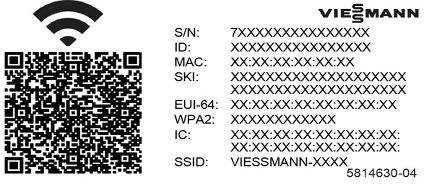 This sticker should usually be in front of the boiler, to the right-hand side of the display. If you cannot find that, remove the screen (HMI), you should find that sticker at the back of the display. Remove it and stick it to the right-hand side of the display. Put the display back and turn the boiler on.
The app prompts you to scan two QR codes. The first one is the one on the boiler's outer left wall, to the left hand side of the barcode. This communicates the boiler's serial number (VIN) to the app. The next one it asks you to scan is the QR code with WiFi symbol. Once connected, the app starts calibrating/ flashing/ reprogramming the part.

