


Setting up Lead/Lag Functions for Server Room
Applicable models: ASU30RLE
*Note: Newer units do not need to be field modified. The jumper should be in place for any models with the Serial number BWB001937 or later.
Tech needs to Field modify(place a Jumper between JM9 circled in Red) or Get modified boards from Fujitsu.
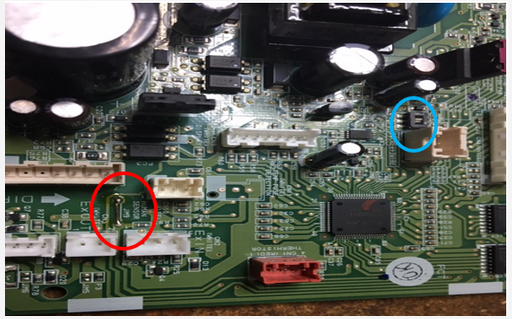
Once modified boards are installed, connect both indoors using terminal for wired remotes & set dip switch circled in Blue to 3 wire.
1.Units wired together, turn power on to both systems.
2.Tech needs to set Function 96, the Server Room function(01 for Primary, 02 for Secondary). Should hear single Beep
3.Turn power off on Primary and Secondary systems for 5 minutes.
4.Must reapply power in this order, Secondary then Primary.
5.Set clock to current time and operating condition of Cool/76F/Hi fan on Primary system.(Should hear single Beep)
6.Set Primary weekly timer from OFF to ON(See Operation Manual) to alternate operation between Primary and Secondary.(Should hear single Beep)
7.Press the manual button on Primary system for 3 seconds or more, Primary starts operating. (Should hear single Beep)

